🎁 New: Build Customer Loyalty & Drive Repeat Purchases with WooCommerce. Learn more


15 Proven Ways to Increase Repeat Purchases in WooCommerce
Getting a first sale is marketing. Getting a second one is the business model.
Most WooCommerce stores spend the majority of their budget acquiring new customers, then quietly let 70-80% of them buy once and never come back. That’s not a traffic problem; it’s a retention problem, and it’s usually far cheaper to fix than the acquisition side ever will be.
Acquiring a new customer typically costs five to seven times more than keeping an existing one, and repeat customers tend to spend more per order as trust builds. Yet most stores are set up almost entirely for the first sale: onboarding, welcome discounts, and abandoned-cart emails, with very little built for what happens after checkout completes.

This guide walks through some concrete, WooCommerce-specific tactics for increasing repeat purchase rate, from checkout mechanics to post-purchase communication to retention tools, like store credit, that keep spending power parked inside your store instead of walking out the door with every transaction.
Ways to Increase Repeat Purchases in WooCommerce
1. Reduce Checkout Friction
Every extra field, redirect, or required account creation at checkout is a chance for a customer to abandon the process, and a rocky first checkout makes a second visit less likely before it even happens. Enable guest checkout, minimise form fields, and offer the payment methods your specific audience actually prefers rather than a generic default set.
Friction compounds on return visits too. A customer who had to re-enter a card number and shipping address in full the first time is far more likely to do it again on autopilot the second time, but a customer who hit an unexpected error, a confusing coupon field, or a payment method they didn’t recognise is far less likely to come back and try the process again.
2. Send a Genuinely Useful Post-Purchase Email Sequence
Most stores stop communicating the moment an order confirmation email goes out. A short sequence covering order status, how to get the most out of the product, and a light nudge toward complementary items performs far better than a single “thanks for your order” email and then silence.
Example: order confirmation on day 0, a shipping update on day 1-2, a usage tip or unboxing guide once the product has likely arrived, and a light complementary-product suggestion around day 10-14, timed to when the customer has actually had a chance to use what they bought, not immediately after checkout.

3. Offer Store Credit on Refunds Instead of Only Cash Back
When a refund is processed straight back to a card, that revenue and that relationship both leave your store for good. Offering store credit as an option, ideally with a small added incentive, keeps the value inside your ecosystem and gives the customer a reason to shop again rather than simply walk away.
4. Build a Visible Customer Wallet or Store Credit Balance
A wallet balance that customers can see on their account dashboard does more than a coupon buried in an inbox. It functions as a standing invitation to return, because unredeemed credit is something people are naturally inclined to use rather than leave on the table.
5. Run a Simple Cashback-to-Wallet Program
Crediting a small percentage of every order back to the customer’s store wallet, rather than as a discount on the same order, pre-funds their next purchase automatically. It costs the same as an equivalent discount but pulls the customer back rather than only reducing the price of the order they were already placing.

6. Reward Referrals With Credit, Not Just Discounts
A referral program that credits both parties’ store wallets, instead of issuing a one-time discount code, gives the new customer a reason to complete their first order and gives the referrer a reason to keep shopping with the balance they’ve earned.
7. Use Order-Based Email or SMS Reminders for Consumables
If you sell anything that runs out like skincare, supplements, coffee, pet food, printer ink, a simple reminder timed to when the average customer would be running low is one of the highest-converting repeat-purchase tactics available, because it targets people who are actually ready to reorder.
8. Make Reordering a One-Click Action
WooCommerce order history should let customers reorder a past purchase without rebuilding their cart from scratch. For repeat-heavy product categories, this single feature can meaningfully shorten the time between orders.

9. Set Up an Abandoned Cart Recovery Flow for Returning Customers Too
Abandoned cart emails are usually designed for first-time visitors, but returning customers abandon carts as well, often due to a shipping cost surprise or a stock question. A recovery email or automated reminder tailored to logged-in customers can recover sales that would otherwise be lost twice.
10. Offer Free or Discounted Shipping on the Second Order
A shipping-focused incentive tied specifically to the next order, rather than a generic sitewide promotion, gives customers a concrete reason to come back rather than shop the same category somewhere else next time.
11. Introduce a Subscription or Auto-Reorder Option
For genuinely repeat-purchase products, offering a subscribe-and-save option turns the decision to buy again into a one-time decision, rather than something the customer has to remember to do every time.

12. Use Post-Purchase Upsell and Cross-Sell Prompts (Sparingly)
A well-timed “customers who bought this also bought” prompt on the order confirmation page or in a follow-up email can introduce a second product category without feeling like a hard sell, especially when it’s genuinely relevant to what was just purchased.
13. Personalise Based on Purchase History
Segmenting email and on-site messaging by what a customer has actually bought, rather than sending identical campaigns to your entire list, measurably increases the odds that a promotion lands on something the customer actually wants.

14. Ask for Reviews at the Right Moment, Then Follow Up
A review request timed to when the customer has had time to use the product does double duty: it builds social proof for new visitors, and the follow-up touchpoint itself is a low-pressure reason to re-engage an existing customer.
15. Let Customers Gift or Transfer Store Credit to Each Other
Peer-to-peer wallet transfers turn happy customers into an informal acquisition channel; someone gifting store credit to a friend brings a warm lead into your store with spending power already attached, at no extra marketing cost.
How to Measure Whether It's Working
Tactics are only useful if you can tell whether they’re moving the number that matters. Track these four metrics before and after rolling out new retention tactics:
- Repeat purchase rate: the percentage of customers who place a second order within a defined window (commonly 90 or 180 days).
- Average time between orders; a shortening gap usually signals that reminders, wallets, or subscriptions are working.
- Customer lifetime value (CLV); rising CLV confirms that retention efforts are translating into real revenue, not just repeat visits.
- Redemption rate on any incentive; for wallets, credit, or referral rewards, a low redemption rate usually points to a visibility problem rather than the incentive itself.
Give any single change at least one full purchase cycle before judging results; for most WooCommerce stores, that means a full quarter, not a few weeks.
It also helps to segment these metrics by acquisition channel and product category rather than looking at store-wide averages alone. A tactic like consumable-reorder reminders, for example, will move the needle heavily for a skincare or supplements store and barely register for a store selling furniture; averaging the two together can make an effective tactic look like it isn’t working when it’s simply being diluted by product categories it was never meant to influence.

Putting It Together
Several of the tactics above, like visible store credit, cashback-to-wallet, referral credit, and peer-to-peer gifting, all depend on the same underlying feature: a wallet system built into the customer’s account. Building that from scratch on WooCommerce usually means custom development.

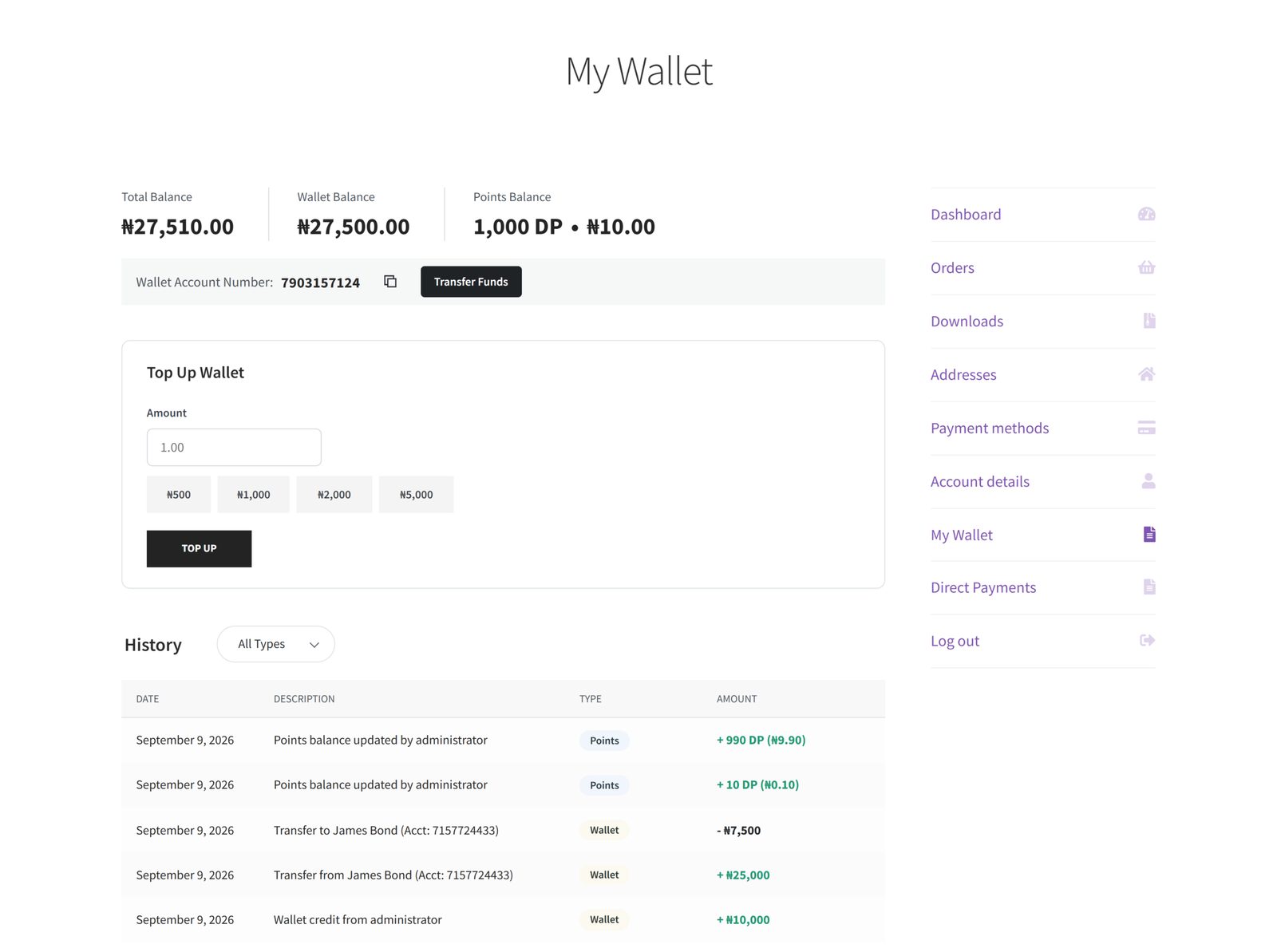
Digages Customer Wallet adds this functionality directly to WooCommerce, based on how the plugin is configured in practice:
- A “My Wallet” dashboard on the customer’s My Account page, showing their balance and unique account number alongside orders and addresses.
- Self-serve top-ups within store-defined minimum and maximum limits, supporting tactic #4 above.
- Partial wallet payments at checkout, so a balance can cover part of an order while the rest is charged through the customer’s usual payment method, directly reducing checkout friction (tactic #1).
- User-to-user wallet transfers, supporting the gifting and referral tactics (#6 and #15) without any extra product setup.
- Admin-issued bonus credit, letting store owners send loyalty or goodwill credit to any customer from the WordPress dashboard, with an optional note.
- Automated email notifications for top-ups, credits, and transfers, so customers actually notice when their balance changes instead of discovering it by accident.
- A centralised admin view of every customer’s email, account number, and wallet balance, for managing credit issuance across a growing customer base.
Rather than treating store credit as a one-off refund workaround, it becomes a standing feature of the store, one that touches checkout, refunds, referrals, and loyalty all at once.
Conclusion
Increasing repeat purchases in WooCommerce rarely comes down to one big change. It’s the combination of a smoother checkout, genuinely useful post-purchase communication, and incentives that keep a reason to return sitting visibly in the customer’s account.
If you’re ready to add store credit, cashback, and referral gifting to your WooCommerce store without custom development, Digages Customer Wallet gives every customer a visible wallet, supports partial payments at checkout, and lets you issue bonus credit directly from your WordPress dashboard.
Explore setup guides for WooCommerce customer-experience tools here, or reach out through Digages to discuss adding wallet functionality to your store.


