🎁 New: Build Customer Loyalty & Drive Repeat Purchases with WooCommerce. Learn more





Why “Shop Manager” Is Too Powerful for Most WooCommerce Teams
When you hire someone to help manage your WooCommerce store, assigning them the Shop Manager role is the obvious move. The name fits. The role is right there in the dropdown. Why would you question it?
Because the Shop Manager role was built as a single catch-all for an entire store operation, and your team is almost certainly not a single person doing everything. It bundles capabilities that belong to a developer, a payment admin, a support rep, and a product manager into one role and hands it to whoever needs “WooCommerce access.”
That’s the problem. Not that Shop Manager is badly designed, it is just designed for a different context than the one most growing stores actually operate in.

This article walks through exactly what Shop Manager contains, which parts create genuine risk for teams of any size, and how to build smarter, leaner alternatives using custom roles. No code required.
What the WooCommerce Shop Manager Role Contains
The Shop Manager role is built into WooCommerce itself. Unlike WordPress’s built-in Editor or Author roles, it’s entirely store-specific, and it carries a much broader set of capabilities than most people realise when they assign it.
Here is what a user with the Shop Manager role can do by default:
- View, edit, and delete all orders, including permanently
- Issue full or partial refunds on any order
- Create, edit, publish, and delete any product or product category
- Create, modify, and delete all coupon codes with no approval required
- Access all WooCommerce reports like revenue, orders, customers, and stock
- View full customer data including billing addresses, phone numbers, and purchase history
- Access WooCommerce Settings including payment gateways, shipping zones, tax rates, and email templates
- Manage WooCommerce system status, debug logs, and REST API keys
- Access and manage WooCommerce webhooks and third-party integrations
That last cluster — payment settings, API keys, system configuration is where the role becomes dramatically over-powered for most of the people you are assigning it to.

7 Reasons Shop Manager Is Too Powerful for Most Store Staff
Each of the following is a real capability bundled into the default Shop Manager role. Some are obvious risks; others are easy to overlook until something actually goes wrong.
1. Access to Payment Gateway Credentials and Settings
The risk: WooCommerce > Settings > Payments
Any Shop Manager can navigate directly to your payment gateway configuration, the screen where your live Stripe API keys, PayPal credentials, and processor secrets are stored.
A staff member who can view these credentials can copy them. One who can edit them can redirect your payment flow, break checkout for every customer on your site, or, in a worst case reroute transactions.
For most order-processing staff, there is no legitimate reason to access payment gateway settings at all. It should belong to the store owner or a senior technical manager only.
Payment gateway credentials are among the most sensitive secrets on any e-commerce site. Exposure does not require malicious intent; a screenshot shared in the wrong Slack channel is enough. Restrict access at the role level, not by asking staff not to look.
2. The Ability to Create Unlimited Coupon Codes
The risk: WooCommerce > Marketing > Coupons
Shop Managers can create, modify, and delete any coupon code. There are no built-in limits or approval workflows. An employee can create a 100% discount coupon with no expiry, no usage limit, and no minimum spend and share it publicly before you notice.
Coupon abuse by internal staff is one of the more common causes of untracked revenue loss on WooCommerce stores, and it is very difficult to spot unless you are actively auditing coupon creation logs.
If specific team members should manage promotions, create a dedicated Marketing Manager role that includes coupon access and leave it out of your order-processing roles entirely.
3. Permanent Deletion of Orders
The risk: Permanent delete on shop_order post type
Orders in WooCommerce are stored as a custom post type. The Shop Manager role includes the ability to move orders to trash and then permanently delete them. This is a genuine data integrity risk.
In a busy support environment, a staff member working through a long order list can accidentally bulk-select and trash orders. Once permanently deleted, the orders disappear from your records and from your accounting unless an external system captured them first.
A support role needs to view, edit, and update orders. The ability to permanently delete them is unnecessary. Build a role that excludes it.
4. Full Access to Shipping Zones and Tax Configuration
The risk: WooCommerce > Settings > Shipping and Tax
Shipping zones determine which customers pay which rates. Tax settings determine what gets collected and reported across every transaction. Both are legally and financially significant, and both are fully accessible to any Shop Manager.
A mistake in tax settings can mean under- or over-collecting across thousands of orders before anyone notices. A changed shipping zone can silently remove delivery coverage for an entire country. Neither of these triggers a warning in default WooCommerce.

5. Unrestricted Product Editing and Deletion
The risk: edit_products, delete_products, publish_products
Shop Managers can create, edit, publish, and permanently delete any product. For a dedicated product manager, this makes sense. For a customer support agent who primarily handles order queries, it does not, but they get full product access anyway.
Accidental edits, a price change, a stock status flip, or a category reassignment take effect in real time. Bulk edits from the product list can affect dozens of listings simultaneously. A support team member who does not manage products should not have the ability to change them.
6. Full Access to Customer Personal Data
The risk: view_woocommerce_reports combined with full order access
Every order in WooCommerce contains personal data: name, email, billing address, shipping address, and phone number. Shop Managers can view and export all of it across your entire order history.
If your store is subject to the General Data Protection Regulation (GDPR), the Nigerian Data Protection Regulation (NDPR), or any comparable privacy framework, granting broad access to personal data beyond operational necessity is not just a security concern; it may be a compliance issue.
Staff should see only the customer data they need to do their specific job. A returns processor needs order and address details. They do not need bulk report access to your entire customer base.
7. Access to WooCommerce System Status and API Keys
The risk: WooCommerce > Status > API Keys
Under WooCommerce > Status, Shop Managers can view your full server environment, PHP version, WordPress configuration, active plugins, and system health. They can also access the REST API key panel, where keys used to connect your store to third-party platforms can be created or revoked.
Revoking an API key can silently and immediately break your inventory sync, shipping provider connection, or ERP integration. Creating a new key provides an external access point to your store data. This is developer-level access bundled into a role most stores hand to support staff.
API key management belongs with your technical lead or store owner. There is no day-to-day operational reason for support, warehouse, or marketing staff to access it.
Common Mistakes When Using the Shop Manager Role
Assigning Shop Manager as the Default for Anything WooCommerce
The most common mistake is treating Shop Manager as the WooCommerce equivalent of a basic user account, a safe default you apply to anyone who touches the store. It is not a safe default. It is a powerful role that should be the exception, not the rule.
Not Reviewing Roles After Staff Changes
Staff responsibilities shift over time. Someone hired as a support agent may move into product management. A full-time manager may go part-time. Without periodic role reviews, people accumulate access that no longer reflects what they actually do, or what they should have.

Assuming WooCommerce Handles Its Own Access Control
WooCommerce does not provide granular role management out of the box. Its built-in roles are intentionally broad. Without a dedicated plugin, you are limited to giving everyone Shop Manager or nothing at all, which is not a functional access control system for a real team.
Forgetting Admin Menu Restrictions
Even when capabilities are restricted, WordPress admin menu items may remain visible. A user who sees an option they should not access will sometimes click it out of curiosity or confusion. Always pair capability restrictions with menu-level controls to create a complete barrier.
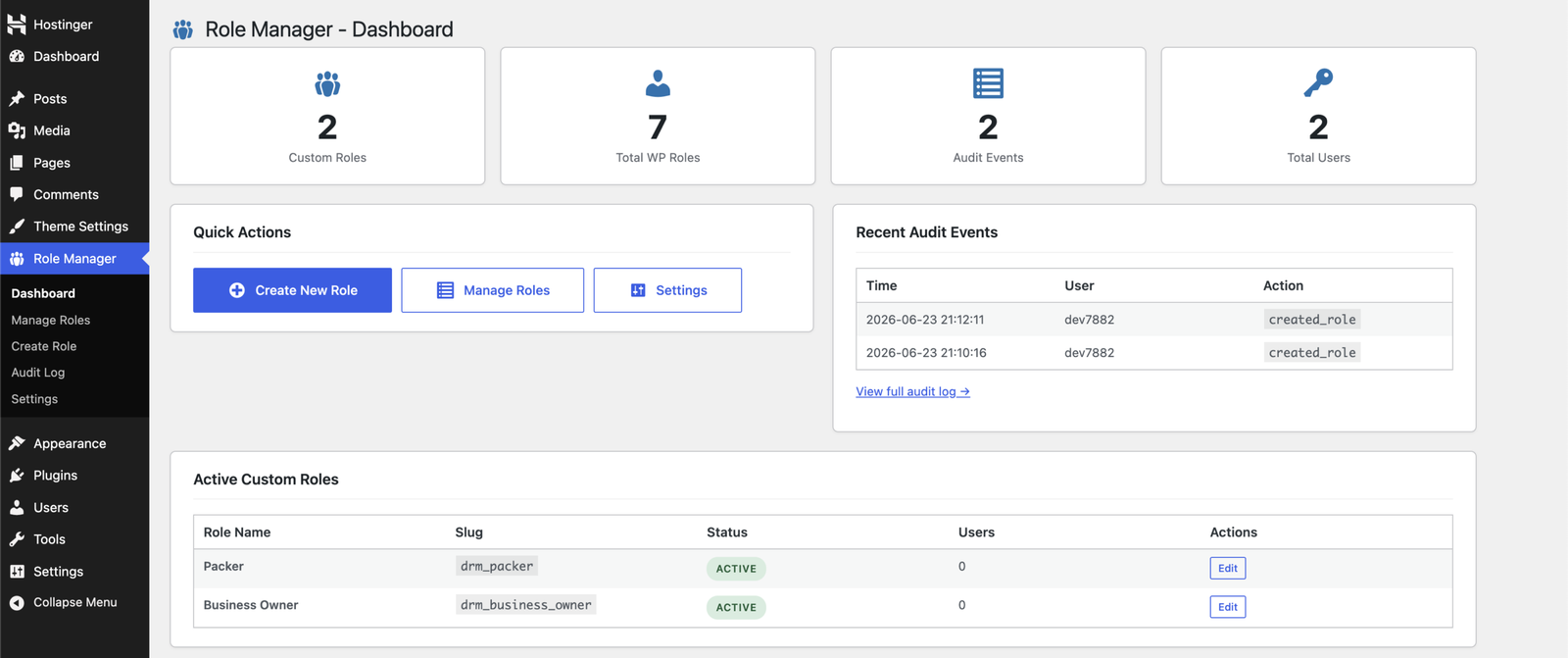
Smarter Alternatives to Shop Manager — Built With Digages Role Manager
The goal is not to restrict your team; it is to give each person exactly what their job requires. Here are three targeted roles that replace the Shop Manager for the most common store-staff scenarios.
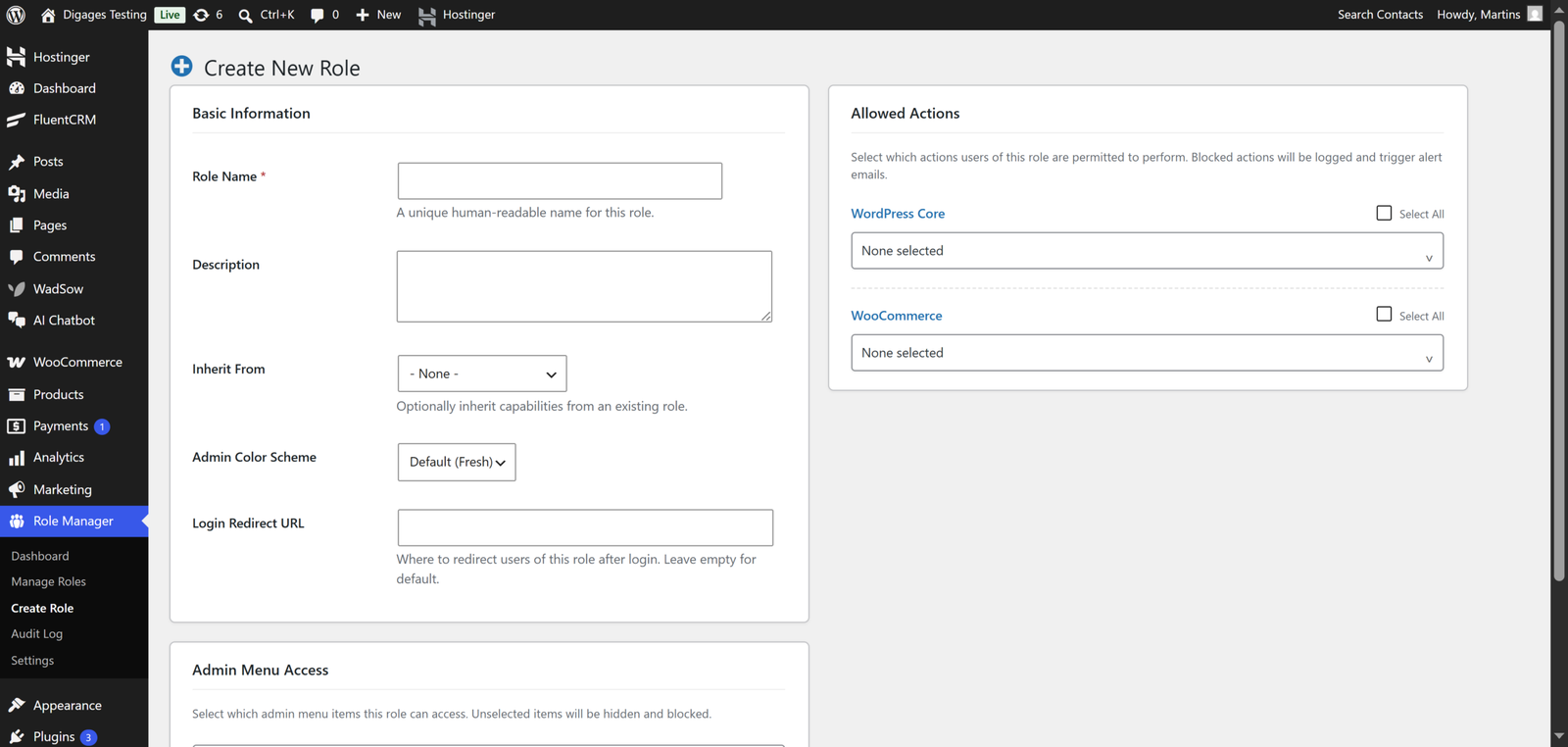
Order Processor (Customer Support)
For team members who handle order queries, refunds, and customer issues.
- Inherit from: None
- WordPress Core: read
- WooCommerce Capabilities: edit_shop_orders, view_woocommerce_reports
- Admin Menu Access: WooCommerce > Orders only
- Login Redirect: WooCommerce Orders list
- Blocked from: Products, Coupons, Settings, Reports (full), Analytics, System Status
Product Manager
For team members responsible for your catalogue, stock levels, and product listings.
- Inherit from: None
- WordPress Core: read, upload_files
- WooCommerce Capabilities: edit_products, publish_products, edit_product_terms, manage_product_terms
- Admin Menu Access: WooCommerce > Products, Inventory
- Blocked from: Orders, Settings, Coupons, Reports, Payment Gateways, API Keys
Store Analyst / Reports Viewer
For finance or management staff who need visibility into store performance without operational access.
- Inherit from: None
- WordPress Core: read
- WooCommerce Capabilities: view_woocommerce_reports
- Admin Menu Access: WooCommerce > Reports and Analytics only
- Blocked from: Orders, Products, Settings, Coupons, Customer data (direct editing)
Use the Login Redirect URL field in Role Manager to send each role directly to their working area on login.
A support agent who lands on the Orders list, not the generic WordPress dashboard, is far less likely to navigate into areas they should not access.
A support agent who lands on the Orders list, not the generic WordPress dashboard, is far less likely to navigate into areas they should not access.
Conclusion
The Shop Manager role does exactly what it was designed to do: give one person comprehensive control over a WooCommerce store. The problem is that in a real team, you do not have one person doing everything. You have specialists, and each one needs a carefully scoped slice of access, not the full bundle.
Handing out Shop Manager to your support team, your warehouse staff, and your marketing assistant is the WooCommerce equivalent of giving everyone a master key to the building. It solves the immediate access problem. It also creates a category of security and operational risk that is entirely avoidable.
Building purpose-built roles with Digages Role Manager takes less than an hour for a typical store setup. That hour of work eliminates a persistent, ongoing risk and gives you an audit trail so you always know what is happening with your store’s most sensitive areas.
Start with your most common staff type. Build one targeted role, test it, and roll it out. The second role takes half as long as the first. Within a morning, your WooCommerce access structure will actually reflect how your team works.
Ready to begin managing your Store roles and permissions? Checkout Digages Role Manager today.