🎁 New: Build Customer Loyalty & Drive Repeat Purchases with WooCommerce. Learn more



On this page
Why WordPress User Roles Are Not Enough for Growing Businesses
WordPress user roles were designed for publishing. Five neat tiers: Administrator, Editor, Author, Contributor, Subscriber, covering just about every situation a single-author blog might face. The original design made perfect sense for 2005.
The problem is that most businesses stopped being blogs a long time ago. Today, WordPress powers e-commerce stores, membership platforms, SaaS landing pages, agency client sites, and complex publishing operations with teams of dozens. The role system underneath all of it is still the same one it always was.

This article makes the case for why the default WordPress user role system falls short for growing businesses and what you actually need once your team, your site, and your operational complexity reach the point where built-in roles start causing more problems than they solve.
What WordPress Gives You By Default
The five default WordPress roles have existed since the platform’s earliest days. They were designed primarily for content publishing workflows, where different people are responsible for writing, reviewing, publishing, and managing content.
Each role reflects a specific publishing responsibility.

Administrator
The Administrator role was intended for the site owner or primary administrator. It provides complete control over the website, including plugins, themes, users, settings, content, and all administrative functions.
Administrators can modify virtually every aspect of a WordPress site, making this the most powerful role in the system.
Editor
The Editor role was designed for managing editors responsible for overseeing content production. Editors can create, publish, edit, and delete posts and pages, including content created by other users.
This role is ideal for managing a team of writers but does not provide the same level of control as an Administrator.

Author
The Author role was created for staff writers who publish their own content. Authors can create, edit, publish, and manage their own posts but cannot control content written by other users.
This role works well for independent content creators with limited administrative responsibilities.
Contributor
The Contributor role was designed for guest writers, freelancers, and occasional content contributors. Contributors can create and edit posts but cannot publish them.
Instead, their content must be reviewed and approved by an Editor or Administrator before it goes live.
Subscriber
The Subscriber role provides the most limited level of access. Subscribers can log in, read protected content where applicable, and manage their own profile information.
They cannot create content, manage settings, or access administrative areas of the site.

Where the Default Roles Fall Short
For traditional publishing websites, these roles work remarkably well. An Editor manages content, Authors write articles, Contributors submit drafts, and Subscribers consume content.
The problem is that modern WordPress sites rarely function as simple publishing platforms.
Today, WordPress powers online stores, membership communities, learning platforms, booking systems, customer portals, SaaS products, and complex business websites. As responsibilities become more specialized, the limitations of the default role system become increasingly obvious.
For example, WordPress does not include a built-in role for someone who manages WooCommerce orders but should not have access to products. There is no role for a support representative who needs to review customer purchases but should never see payment gateway settings. Likewise, there is no role for a developer who needs access to plugins and technical tools without receiving permission to manage user accounts.
The gap between Administrator and Editor is particularly significant. Administrators receive almost unlimited access, while Editors are focused primarily on content management. Below Editor, permissions become even more restrictive.
As businesses grow, these broad role definitions often force site owners into uncomfortable compromises: either grant too much access or prevent staff from doing their jobs efficiently.
This is why many organisations eventually move beyond the default WordPress roles and begin creating custom roles tailored to specific responsibilities. Instead of assigning permissions based on generic publishing jobs, custom roles allow access to be aligned with real business workflows.
What "Growing" Actually Means in Role Terms
A business doesn’t need to be large before it outgrows the default roles. Growth in this context is about operational complexity.
You’ve outgrown the default roles when:
- More than one person logs into WordPress, and those people have different job functions
- You’re using WooCommerce and have team members who handle orders, products, or customer service
- You need some users to access specific plugin settings without accessing all settings
- You want to know who made a change to your site and when
- You’ve started giving team members Administrator access because nothing else gave them what they needed
- A team member’s account is no longer active, but you haven’t thought through what to do about it
- You’re onboarding new team members and thinking “I’ll just give them Editor for now”
If any of those resonate, the default role system is already working against you, even if you haven’t had an incident yet.
Scenarios Where Default WordPress Roles Break Down
Rather than speaking in abstractions, here are some common business situations where the default role system creates genuine problems.
1. The WooCommerce Store With a Support Team
A growing online store has two customer support agents who handle order queries, refunds, and customer emails. They need to view and update orders in WooCommerce. The closest built-in option? Shop Manager.
But Shop Manager also gives them access to payment gateway settings, tax configurations, shipping zones, and WooCommerce’s global store settings. None of that is relevant to answering a customer’s refund request. And all of it is a security and compliance risk in the hands of someone whose job is answering emails.

2. The Agency Running Client Sites
A web agency manages ten client WordPress sites. Each site has junior developers who handle specific client work, but shouldn’t be able to install unapproved plugins, modify site-wide settings, or access another client’s data. The default role structure offers no clean way to achieve this. Giving junior developers Editor access means they can’t do the technical work. Giving them Administrator access means they can do far too much of it.
3. The Membership Site With Tiered Contributors
A membership platform has three tiers of contributing members: free contributors who can submit draft content, paying members who can publish their own work, and premium members who can moderate comments. WordPress’s Contributor and Author roles don’t map cleanly to this structure, and there’s no way to grant comment moderation without granting full Editor access along with it.

4. The Retail Brand With Seasonal Marketing Staff
A retail business brings on seasonal marketing contractors for their end-of-year campaign. These contractors need to create and schedule posts, upload images, and access their email marketing plugin’s admin screen. They absolutely should not be able to see order data, customer information, or store settings. There’s no built-in role that hits this target precisely.
5. The Growing Blog With Multiple Editors
A content site has grown from a sole-author blog to a team of six writers and two managing editors. The managing editors need to publish and edit all content, but the site owner doesn’t want them installing plugins or changing permalink settings. The built-in Editor role is close, but it includes the ability to manage categories, tags, and other options that the site owner would prefer to control personally.

6. The Business With Compliance Requirements
A business in a regulated industry needs to demonstrate that sensitive customer data can only be accessed by authorised staff, and that those accesses are logged. The default WordPress role system has no audit logging. It can’t show you who accessed an order, when they did it, or what they changed. That makes it essentially useless from a compliance perspective.
The Hidden Costs of Getting Permissions Wrong
When businesses over-grant permissions because the default roles don’t offer a better option, the costs aren’t always immediate, but they accumulate.
Security Exposure
Every over-privileged account is a potential entry point. If a team member with unnecessary admin access has a weak password or falls for a phishing email, the attacker inherits those permissions. An account that only has order access is a much smaller target than one that can install plugins or access payment settings.
Accidental Damage
Most permission-related incidents aren’t malicious; rather, they’re accidental. A well-meaning team member changes a setting they don’t understand, deletes a product category that was in active use, or installs a plugin that conflicts with your existing setup. The default role system offers no protection against this because there’s no way to restrict the specific actions that cause the most damage.
Compliance Risk
Businesses handling customer data under GDPR or similar regulatory frameworks are expected to demonstrate that access to personal data is limited to those with a legitimate need. Broad default roles make that demonstration difficult. A proper role management system, with audit logging, makes it straightforward.
Operational Friction
Paradoxically, both over-granting and under-granting permissions create friction. Over-granting creates the risks above. Under-granting means team members constantly can’t access what they need and escalate to administrators to get things done. A well-designed custom role structure reduces both problems simultaneously.
Offboarding Risk
When someone leaves a business, their WordPress account often stays active longer than it should, because the person responsible for removing it isn’t sure who has access to what or whether removing the account will break something. A clear role structure, combined with an audit log of what each account has done, makes offboarding faster and more confident.
What Growing Businesses Actually Need From a Role System
Based on the scenarios above, here’s what a role management system for a serious business actually needs to provide, none of which comes from WordPress’s default setup.
- Granular capability control. The ability to pick specific capabilities for each role rather than accepting predefined bundles.
- WooCommerce capability integration. Separate, clear control over WooCommerce-specific permissions without having to touch code.
- Admin menu restriction. The ability to hide irrelevant or sensitive admin menu items independently of capability settings.
- Audit logging. A record of who did what and when, across all role-related activity on the site.
- Alert notifications. Proactive notification when something unexpected happens, rather than discovering problems after the fact.
- Role lifecycle management. The ability to create, edit, disable, and delete roles cleanly without disrupting active users.
- No code required. Business owners and site administrators should be able to manage roles through a proper interface, not functions.php.
How Digages Role Manager Fills the Gap
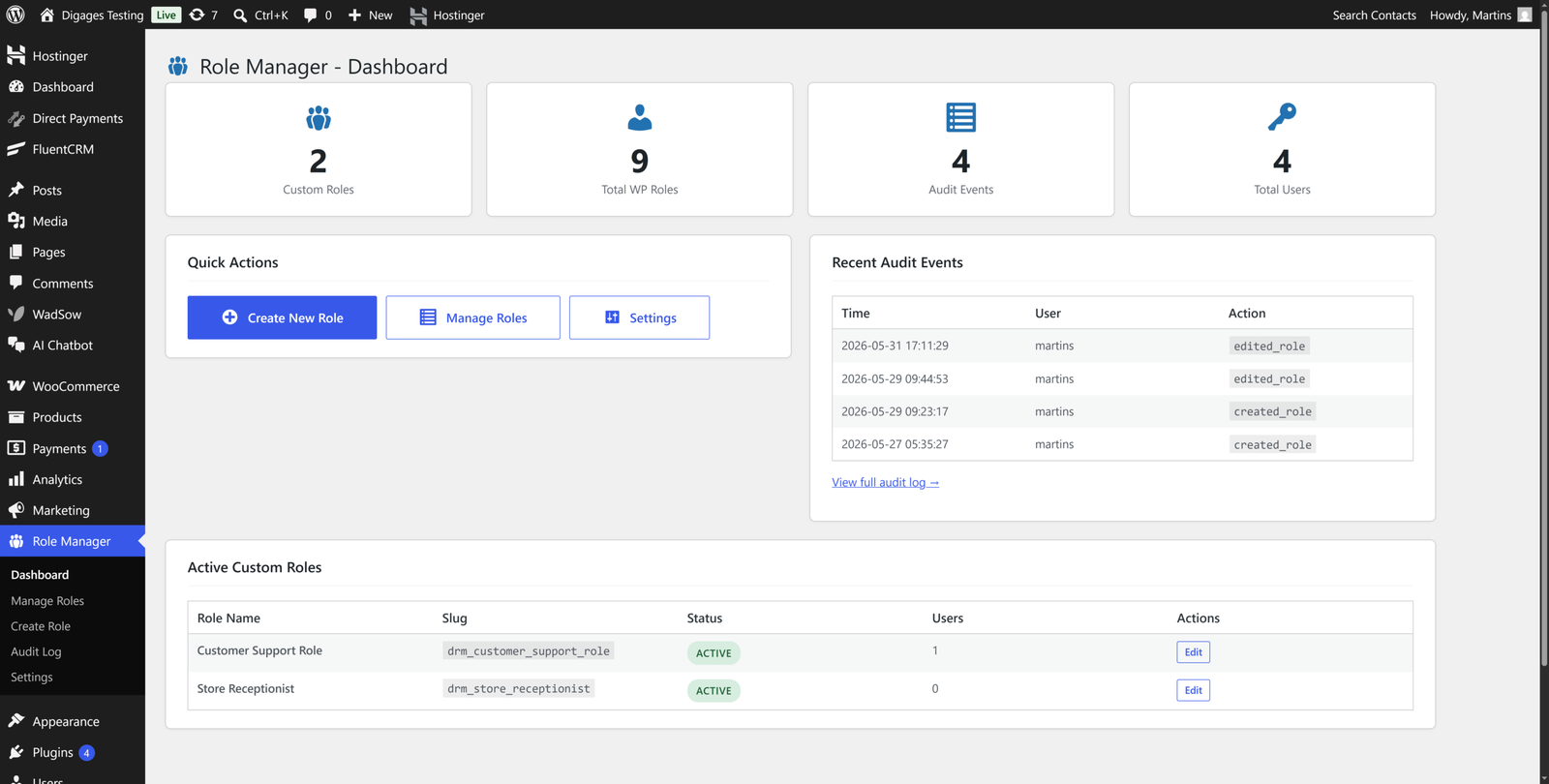
Digages Role Manager is a WordPress plugin built to address exactly the limitations described in this article. It doesn’t try to replace the default role system, but it extends it in the places where it runs out of road.
Custom Role Creation With Precise Capability Control
When you create a role in Digages Role Manager, you start with a clean slate. You give it a name and description, optionally inherit from an existing role as a starting point, and then pick individual WordPress core and WooCommerce capabilities from a structured interface. There are no capability bundles to accept or reject, you choose exactly what each role includes.
For growing businesses, this means you can build roles that map directly to your actual job functions. Customer Support Agent, Warehouse Packing Staff, Junior Product Manager, Marketing Contractor, each one configured precisely for what that person does every day.
Admin Menu Access as a Second Permission Layer
Capabilities control what a user can do. Admin Menu Access controls what they can see in the sidebar. Digages Role Manager gives you both, and they work independently, which matters because some areas of the WordPress admin are accessible through the menu even when the underlying capability isn’t explicitly granted.
Restricting the admin menu also improves the user experience for your team. A support agent who logs in and sees only the Orders screen can get to work immediately without navigating a sidebar full of irrelevant options.
Audit Logging Built In
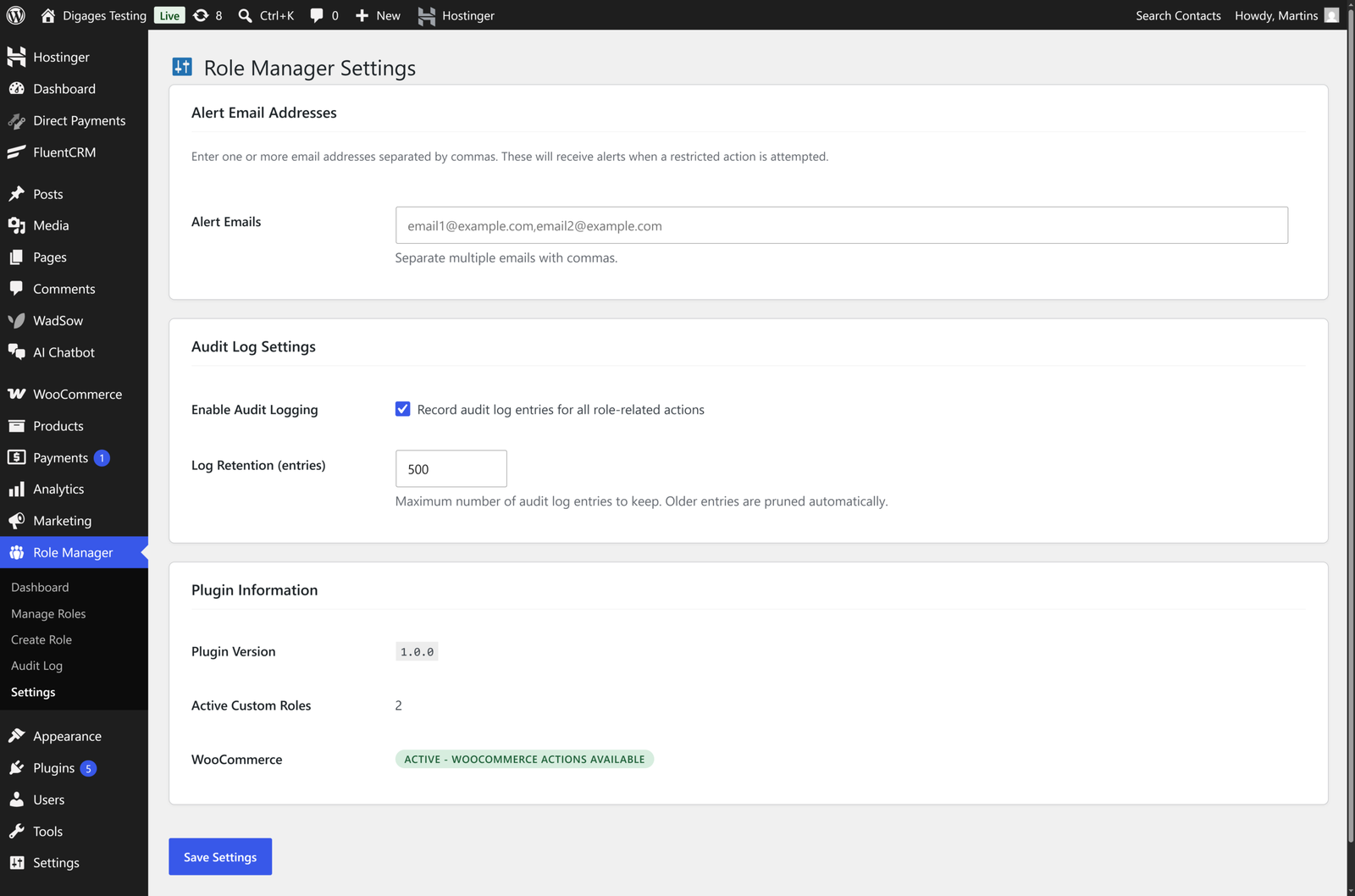
Every significant role-related action in Digages Role Manager is logged: role creation, edits, deletions, user role changes, and blocked access attempts. Each log entry includes a timestamp, the responsible user’s name, the type of action, the affected role, and the IP address.
For businesses with compliance requirements, this creates the paper trail that regulators expect. For all businesses, it creates accountability and means that when something changes unexpectedly, you have a clear record of what happened.
Alert Emails for Unexpected Actions
You can configure Digages Role Manager to send an alert email to one or more addresses any time a user with a custom role attempts an action their role doesn’t permit. This turns a passive access control system into an active monitoring system without requiring manual review of the audit log.
Conclusion
WordPress user roles were built for a simpler version of the internet, where most sites were personal publishing projects and a five-tier hierarchy covered the full range of use cases. That description fits almost no business using WordPress today.
Growing businesses need a role system that reflects their actual team structure: specific job functions with specific access requirements, managed through a proper interface, with the logging and monitoring needed to catch problems early.
The default WordPress user roles are a starting point, not a destination. For most businesses, the moment a second person logs into WordPress, the default system is already working at the edge of what it can do cleanly.
Building proper custom roles with Digages Role Manager, a tool designed for the job, is one of the most practical things a growing WordPress business can do to protect its site and its team.