🎁 New: Build Customer Loyalty & Drive Repeat Purchases with WooCommerce. Learn more


Invoice statuses define the lifecycle of an invoice—from creation to final payment confirmation. Understanding how each status works is essential for tracking payments, managing follow-ups, and maintaining an accurate invoicing workflow.
This guide explains what each status means and how it fits into the overall invoice process.
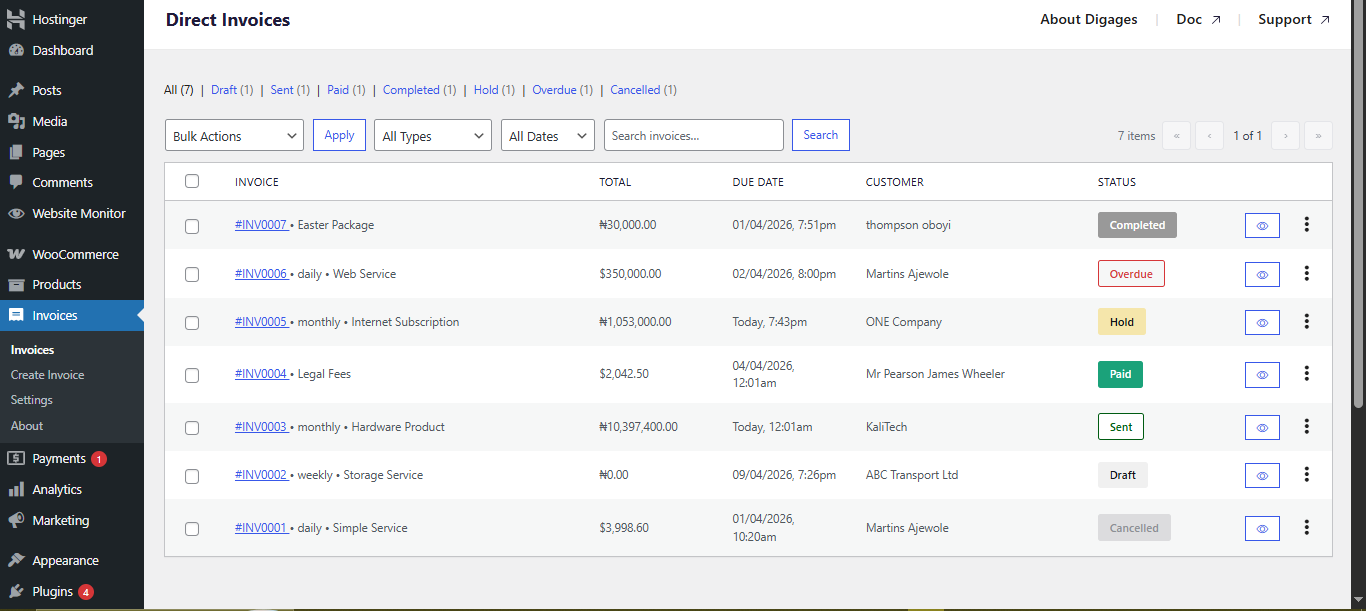
Invoice Statuses Explained
Direct Invoices uses seven statuses to represent different stages of an invoice.
Draft
- The invoice has been created, but has not yet been sent
- It is only visible to the admin
- Customers cannot see or interact with it
When to use it:
Use Draft when preparing or reviewing an invoice before sending it.

Sent
- The invoice has been delivered to the customer
- The customer can view the invoice and take action
- Awaiting payment or response
What happens next:
The customer can proceed to make a payment or mark the invoice as paid.

Paid
- The customer has clicked “I have paid.”
- This indicates payment has been initiated
Important:
- Payment is not yet confirmed at this stage
- You must verify the payment manually on your end
Do not treat this as a final confirmation of payment.
Hold
- The invoice is under review
- Used while verifying the customer’s payment after a while

Completed
- Payment has been successfully verified
- The invoice is finalized
What changes at this stage:
- The transaction is considered complete
- A receipt becomes available as proof of payment
Cancelled
- The invoice is no longer valid
- The payment process has been stopped
When to use it:
- The customer did not proceed with payment
- The invoice was created in error
- Payment is no longer required
Overdue
- The invoice was sent, but not paid before the due date
What to do:
- Send reminders
- Follow up with the customer
- Re-evaluate payment terms if necessary

The typical invoice lifecycle follows this sequence:
Draft → Sent → Paid → Completed
From Trigger to Completion
- You create an invoice (Draft)
- You send it to the customer (Sent)
- The customer confirms payment (Paid)
- You finalize the invoice (Completed)
- You use (Hold) when payment is not confirmed for a while, and you want to verify the payment
This structure ensures:
- Customers initiate payment confirmation
- You retain control over final verification
Common Mistakes to Avoid
- Treating Paid as confirmed payment
- Leaving invoices in Draft without sending
- Ignoring overdue invoices
Final Note
Invoice statuses are more than labels—they define how your invoicing workflow operates. Using them correctly ensures accurate tracking, reduces payment errors, and creates a more reliable billing process for your business.








