Digages Website Monitor; An Introduction

Last modified: June 18, 2026

Introduction

Every WordPress website, whether a small blog or a large WooCommerce store, carries risks: unauthorised login attempts, unexpected admin changes, and suspicious visitor behaviour. Without visibility into these events, site owners are often the last to know when something goes wrong — sometimes only after significant damage has already been done.

Digages Website Monitor is a dedicated WordPress plugin designed to give site administrators real-time insight into what is happening across their website. Built for WordPress sites of all sizes, it combines activity tracking, login security enforcement, and admin-change alerting into a single, easy-to-use dashboard.

What is Digages Website Monitor

Digages Website Monitor is a WordPress plugin that records, analyses, and alerts on user activity across your site. It operates in the background, silently logging every significant action — from page visits and login attempts to plugin activations and settings changes — and presents the information in clean, filterable tables within your WordPress admin panel.

Unlike generic security scanners that only look for malware, Digages Website Monitor focuses on behavioural monitoring: who is doing what, from where, and when. This makes it particularly valuable for multi-user sites, WooCommerce stores, membership platforms, and any site where several people share administrative access.

Core Features

The plugin is organised around three primary modules, each accessible from the sidebar submenu under ‘Website Monitor’:

Activity Logs

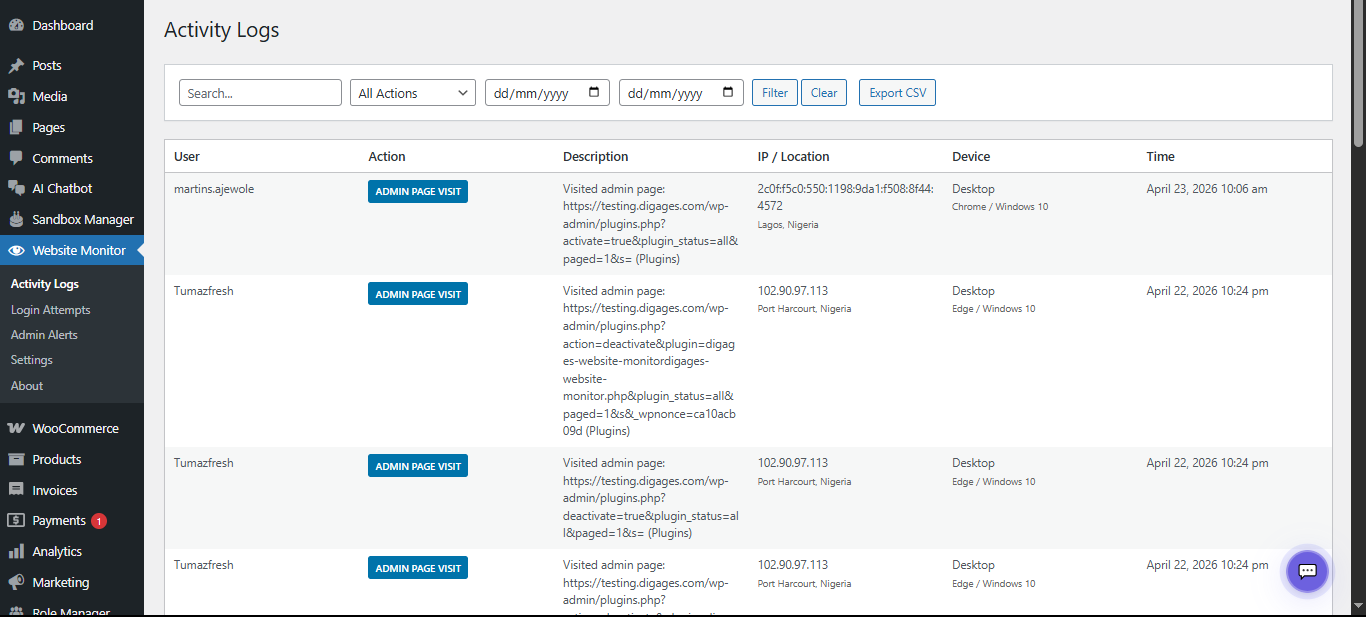
The Activity Logs module is the heartbeat of Digages Website Monitor. It records a timestamped log of every tracked event on the website, including which user triggered it, the exact URL involved, the user’s IP address and geographic location, the device and browser used, and the precise date and time of the event.

Each log entry captures the following data points:

  • User – the logged-in username, or ‘Guest’ for anonymous visitors
  • Action – the type of event (e.g., Page Visit, Admin Page Visit)
  • Description – the specific page URL or action performed
  • IP / Location – the visitor’s IP address and resolved country/city
  • Device – operating system and browser information
  • Time – the exact date and timestamp of the event

Administrators can filter the Activity Logs by action type or date range, and export all records to a CSV file for external analysis or compliance reporting.

Example: A guest visit from Boydton, United States at 3:04 pm is automatically distinguished from an authenticated admin visit from Abuja, Nigeria at 3:07 pm — giving you instant context on every event.
Login Attempts

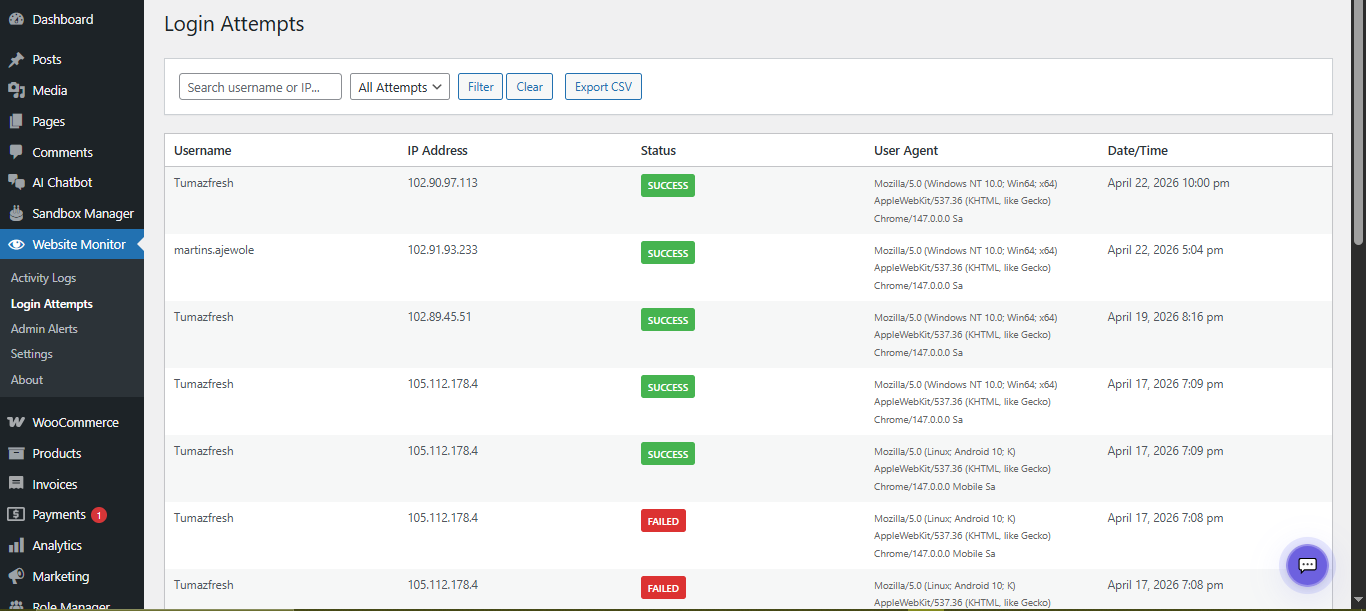
The Login Attempts module logs every attempt to authenticate on the website, whether successful or failed. This provides a clear audit trail that helps identify brute-force attacks, compromised credentials, or unusual login patterns.

Each login attempt record includes:

  • Username – the account name used in the login attempt
  • IP Address – the originating IP of the login request
  • Status – whether the attempt was a SUCCESS or a FAILURE
  • User Agent – the browser and operating system details
  • Date/Time – the exact timestamp of the attempt

The module also enforces automatic IP lockouts. When a configured number of consecutive failed login attempts is detected from the same IP address, the plugin temporarily blocks further login attempts from that IP for a defined period. This makes it significantly harder for automated bots to carry out brute-force password attacks.

Admin Alerts

The Admin Alerts module is one of the most security-critical features of Digages Website Monitor. It tracks administrative-level changes made to the WordPress installation, creating an audit trail of who changed what and when.

Admin Alerts currently track changes of the following types:

  • PLUGIN – plugin activations and deactivations
  • THEME – theme changes
  • SETTINGS – changes to WordPress or WooCommerce settings
  • USER – user role changes or new user creation

For every alert, the following information is recorded:

  • Type – the category of admin change (e.g., PLUGIN)
  • Item – the specific plugin, theme, or setting that was changed
  • Action – the change performed (e.g., Activated, Deactivated)
  • User – the administrator who made the change
  • IP Address – the IP from which the change was made
  • Date/Time – the precise timestamp of the change

Note: Even trusted team members can make accidental or unauthorised changes. Admin Alerts ensure every modification is recorded and attributable.

The Dashboard
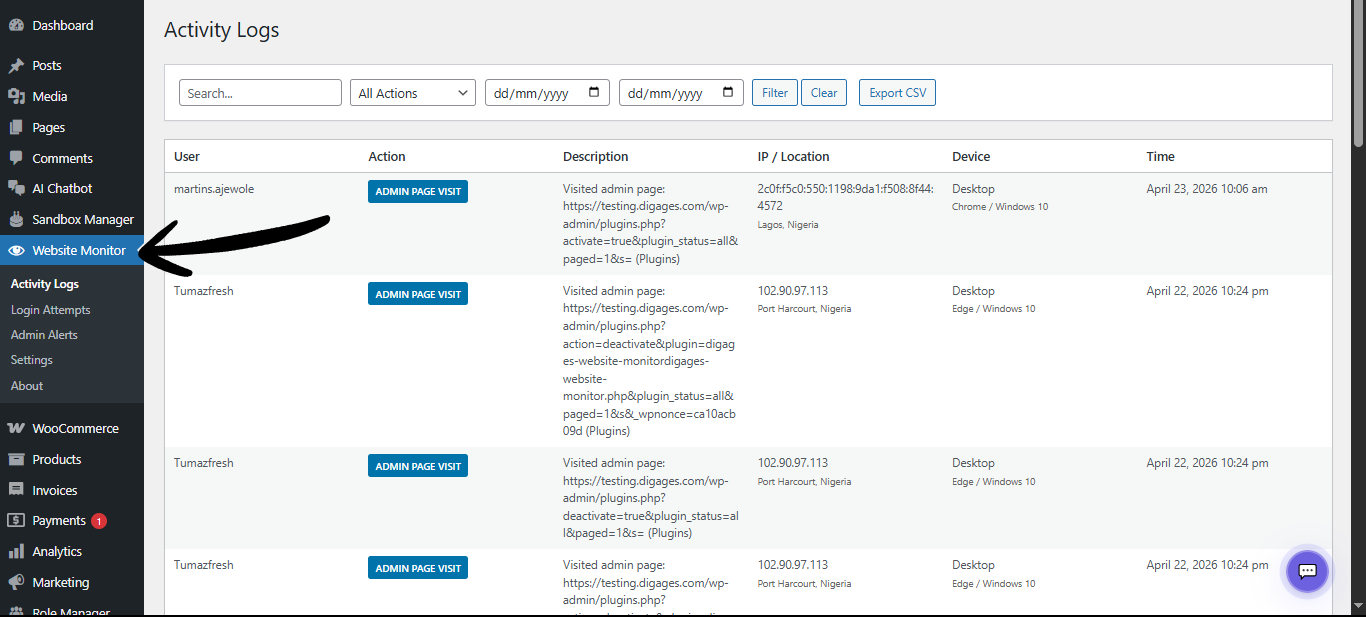
Once installed and activated, Digages Website Monitor adds a ‘Website Monitor’ item to the WordPress admin sidebar.

  • Expanding this menu reveals four sub-pages:
    Activity Logs: View all tracked user and visitor activity across the site
  • Login Attempts: Review all successful and failed login attempts with IP data
  • Admin alerts: See a log of all administrative changes made to the site
  • Settings: Configure all plugin modules, security rules, and notifications

Aside from ‘Settings,’ the three log pages share a consistent interface: a search bar, dropdown filters, date-range pickers, and an Export CSV button. This makes it straightforward to investigate a specific incident, isolate activity from a particular user or IP, or generate compliance reports.

Why this Matters

Security threats do not always announce themselves. A compromised admin account might make subtle changes that go unnoticed for weeks. A persistent bot might be trying thousands of password combinations overnight. An unauthorised user might have been quietly browsing your admin panel for days.

Digages Website Monitor provides the visibility needed to detect and respond to these threats quickly. Here is a summary of the key value it delivers:

Why This Matters and Who Should Use This Plugin

Why this Matters

Security threats do not always announce themselves. A compromised admin account might make subtle changes that go unnoticed for weeks. A persistent bot might be trying thousands of password combinations overnight. An unauthorised user might have been quietly browsing your admin panel for days.

Digages Website Monitor provides the visibility needed to detect and respond to these threats quickly. Here is a summary of the key value it delivers:

  • Early threat detection: Real-time logs surface suspicious activity before damage occurs
  • Accountability: Every action is tied to a user, IP, device, and timestamp
  • Brute-force Protection: Automatic IP lockout after configurable failed login attempts
  • Change Tracking: Full audit trail of all admin-level changes to the site
  • Compliance Support: CSV export of all log data for reporting and auditing purposes
  • Multi-user Visibility: Monitor the actions of all administrators, editors, and contributors

Who Should Use This Plugin

Digages Website Monitor is ideal for:

  • WooCommerce store owners; that needs to track order-related page visits and detect unauthorised access to checkout or order data
  • Multi-admin WordPress sites: where several people share access, and accountability is essential
  • Membership and subscription sites; that hold sensitive user data requiring activity oversight
  • Agencies and developers: managing multiple client websites that need a reliable audit trail
  • Security-conscious site owners; who want to stay ahead of potential threats without installing a complex security suite

Conclusion

Digages Website Monitor is a purpose-built WordPress security and activity monitoring plugin that gives site owners unprecedented visibility into what is happening on their website. With dedicated modules for activity logging, login attempt tracking, and admin change alerting, it provides the foundation for a proactive security posture — without requiring technical expertise to use.

Whether you are protecting a WooCommerce store, a membership platform, or a multi-author blog, Digages Website Monitor ensures that no significant action goes unnoticed.

Was this article helpful?
No




